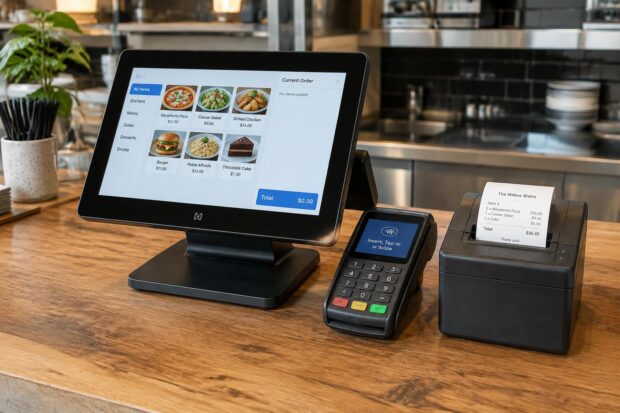
Welcome to the complete buyer’s guide for modern dining establishments looking to upgrade their front-of-house and kitchen technology. Choosing the right restaurant EPOS system is no longer just about processing transactions; it is about transforming your entire hospitality business. In the competitive UK restaurant industry, utilising an advanced EPOS system for restaurants can dramatically improve your daily operations, speed up table service, and elevate the overall guest experience.
Why Dine-In Restaurants Need More Than a Standard Till

Operating a successful sit-down restaurant requires sophisticated tools that go far beyond a traditional cash register. Modern restaurant owners must rely on a robust restaurant POS system to handle complex table service, reservations, and staff management efficiently, utilising the latest hospitality EPOS technology. By integrating specialised EPOS software into your daily workflow, you can easily take tableside orders, manage inventory, and speed up service during peak hours.
The True Cost of Slow Table Turnover in High-Rent Areas (London & South East)
In bustling locations across London and the South East, high commercial rents mean that every minute a table sits occupied waiting for a bill or delayed order hurts your bottom line. Utilising advanced table management features within your point of sale setup allows venues to maximise covers per night. When you implement a smart EPOS equipped with real-time tracking, your team can drastically reduce wait times, clear tables faster, and ultimately boost profitability across the entire hospitality business.
Eliminating Front-of-House to Kitchen Friction
Miscommunication between servers and chefs is a common bottleneck in any busy restaurant business, leading to delayed meals and frustrated diners—a problem easily solved with a reliable restaurant management system. By deploying a connected kitchen display system alongside handheld EPOS devices, front-of-house staff can instantly transmit orders directly to the kitchen pass without running back and forth. This seamless integration ensures that every ticket is processed accurately, reducing errors and creating a harmonious workflow between the dining room and the culinary team.
6 Must-Have Features in a Modern Restaurant EPOS System
1. Interactive Floor Plans & Live Table Management
Effective table management is the heartbeat of any thriving dining establishment, allowing floor staff to oversee covers, monitor table status, and minimise guest wait times with precision. By utilising a sophisticated EPOS system featuring customisable floor plans, restaurant owners can dramatically streamline their daily restaurant operations. This advanced restaurant EPOS functionality ensures that front-of-house teams can easily track available seating, accommodate walk-ins, and optimise table turnover during peak trading hours across busy UK venues.
2. Handheld iPad Ordering & Course Pacing
Empowering your waiting staff with portable tablets allows them to take orders directly tableside, instantly firing starters or holding mains and desserts to achieve perfect course pacing. Integrating these mobile ordering tools with your main POS system ensures that all dietary modifiers and special requests are transmitted straight to the kitchen pass without delay. This capability not only speeds up service but also elevates the customer experience by reducing order mistakes and keeping servers present on the restaurant floor where they matter most.
3. Kitchen Display Systems (KDS) vs. Kitchen Printers
Modern UK culinary teams are rapidly moving away from messy paper tickets in favour of a digital kitchen display system (KDS) that organises orders chronologically and highlights preparation times. When paired with a comprehensive restaurant POS system, these digital screens eliminate the miscommunications often caused by traditional kitchen printer setups. This technological shift improves accuracy, reduces food waste, and creates a much calmer, highly efficient environment for chefs handling complex menu items during heavy rushes.
4. Seamless Bill Splitting, Service Charge & Integrated Payments
Handling payments at the end of a meal can frequently become a bottleneck unless your restaurant EPOS system supports effortless bill splitting and automated discretionary service charge calculations. By connecting your EPOS software directly to fast integrated card machines like Dojo, staff can eliminate manual double-keying errors and process pay-at-table transactions in seconds. This seamless integration between the point of sale and payment processing accelerates table turnover, delights departing diners, and reconciles end-of-night takings with complete accuracy.
5. True Offline Mode: Keeping Service Running When the Wi-Fi Drops
Historic London brick buildings and basement dining rooms frequently suffer from fluctuating internet connectivity, making a robust offline mode an essential requirement for uninterrupted hospitality operations. A reliable cloud-hybrid EPOS will enhance your restaurant management capabilities and continue to process transactions, print kitchen tickets, and take orders locally even when the broadband drops, syncing all data securely to the cloud once the connection is restored. This resilience protects your venue from catastrophic service halts during critical Friday and Saturday evening rushes.
6. Real-Time Ingredient, Allergen & Stock Control
Maintaining meticulous stock management and strict compliance with UK allergen regulations (including Natasha’s Law) is effortless when utilising an integrated EPOS system for restaurants with built-in inventory tracking. As dishes are sold, the software updates ingredient levels in real time, alerting management to low stock and helping to protect diners by prompting staff on dish allergens clearly. This level of oversight protects your gross profit margins, reduces food waste, and keeps your kitchen fully compliant.
Restaurant EPOS Hardware Essentials
When setting up a new restaurant EPOS system, selecting durable commercial hardware is just as crucial as choosing the right software. You need equipment built to withstand the demanding environment of a busy UK hospitality venue, from kitchen heat and bar spills to constant use on the dining floor. Essential components typically include:
- Commercial-grade iPad or touchscreen terminals and stands
- Handheld waiter tablets for tableside ordering
- High-speed thermal receipt and kitchen printers
- Heavy-duty cash drawers to ensure till accountability
- Clear, heat-resistant Kitchen Display System (KDS) screens
Investing in sleek, modern hardware not only improves the aesthetics of your front counter and bar area, but also ensures fast, reliable performance during peak service hours without unexpected equipment failures.
Comparing the Top UK Restaurant EPOS Systems (Cost vs. Value)
Navigating the market for the best restaurant EPOS systems can be challenging, especially when comparing upfront hardware costs against long-term monthly software fees. Many restaurant owners focus solely on the headline subscription price, but understanding the true financial commitment requires looking at the entire package. A quality restaurant POS system should offer transparent UK pricing that covers both your software and hardware needs without hidden surprises.
Hidden Fees to Watch Out For
When evaluating different providers on the market, watch out for hidden contract traps that can quickly inflate the true cost of your EPOS system:
- Expensive per-terminal or per-iPad monthly licensing fees
- Forced merchant payment processing rates that lock you into unfavourable card machine contracts
- Paid customer support tiers for weekend or evening cover
- Restrictive multi-year lock-in agreements and paid menu update fees
A transparent provider will offer clear pricing for their EPOS software and hardware bundles without penalising your hospitality business as you grow or add new handheld terminals.
Cloud-Hybrid vs. Legacy Server Systems
Deciding between a cloud-hybrid model and a legacy server-based restaurant POS system is a major choice for any modern dining establishment. Legacy server setups often require expensive back-office PC hardware, complex local maintenance, and leave your restaurant operations vulnerable if the main server fails. In contrast, a modern cloud-hybrid restaurant EPOS system stores your critical reporting data securely in the cloud while retaining local offline processing to keep service running smoothly.
When comparing modern solutions like CubePOS against traditional UK hospitality providers, cost transparency and ease of use are the primary differentiators. Traditional providers often rely on complex pricing structures, expensive installation fees, and rigid contracts, whereas CubePOS offers straightforward packages—with restaurant software starting from £24.99/month and complete hardware bundles from £599 with no hidden add-ons. Independent venues and multi-site operators across the UK can access enterprise-grade table management, stock control, and integrated Dojo payments without breaking their operating budgets.
Why Local Installation & Weekend Support Matter for London & Surrounding Venues
One of the biggest anxieties for any restaurant owner when upgrading technology is the fear of a technical issue during peak weekend trading hours. Knowing that your chosen EPOS system comes with responsive UK customer support provides complete peace of mind. For venues located across London, Hertfordshire, Essex, Surrey, Kent, and Berkshire, having access to experienced hospitality engineers who understand the pressures of live service is invaluable. Whether you need assistance with full menu setup, floor plan configuration, staff training, or zero-downtime installation between lunch and dinner service, dedicated support ensures your restaurant operations never miss a beat.
Frequently Asked Questions About Restaurant EPOS Systems
How much does a restaurant EPOS system cost in the UK?
Determining the financial investment for a new restaurant EPOS setup depends on various factors, including the size of your venue and your specific operational needs. Typically, restaurant owners encounter a combination of software and hardware costs, ranging from affordable monthly subscriptions for EPOS software to comprehensive bundles that include a touchscreen terminal, receipt printer, cash drawer, and kitchen display system. When budgeting for your hospitality business, it is essential to look beyond the initial price tag and evaluate the long-term value provided by table management, inventory tracking, and integrated payment processing. CubePOS offers transparent UK pricing, with restaurant EPOS software starting from £24.99/month and complete hardware bundles for £599.
Can a restaurant EPOS system work without internet (Offline mode)?
Internet reliability can occasionally fluctuate, particularly in historic buildings, basements, or densely populated areas within the UK restaurant sector. A high-quality restaurant POS system features a robust offline mode that ensures your restaurant operations never grind to a halt due to a dropped Wi-Fi connection. During network outages, staff can still take orders, print tickets to kitchen printers, and manage table service locally. Once the internet connection is re-established, the EPOS software automatically synchronises all transaction data in real time, safeguarding your daily takings and ensuring continuous, uninterrupted service for your diners even during the busiest weekend rushes.
How long does it take to switch EPOS systems without closing for service?
Transitioning to a new restaurant EPOS solution does not require shutting down your dining room or interrupting your daily hospitality business. With professional onboarding, dedicated customer support, and pre-configured hardware and software packages, the migration process can be completed swiftly outside of trading hours. Suppliers typically assist with several key setup tasks, including:
- Importing and building your full food and drinks menu
- Setting up custom floor plans for table management
- Training your front-of-house and kitchen staff ahead of launch
This preparation guarantees a seamless transition, allowing restaurant owners and staff to adopt the new point of sale technology confidently without losing a single service or disrupting the guest experience.
How can an EPOS system streamline restaurant management?
A well-configured system helps staff take tableside orders and process payments faster, while automatically routing order details between the front of house, bar, and kitchen. Integrated live reporting and stock management reduce manual admin work and give managers a clear, real-time view of sales, covers, and ingredient usage from any device.
What EPOS hardware does a restaurant need?
Restaurant EPOS hardware typically includes a touchscreen POS terminal or iPad stand, thermal receipt printer, cash drawer, kitchen display screen (KDS) or kitchen printer, integrated card reader, and handheld ordering tablets for waitstaff. Choose commercial-grade hardware that suits your venue layout, service style, and table volume.
Can a restaurant EPOS system support mobile ordering and kiosks?
Many modern EPOS systems support handheld waiter tablets, QR table ordering, self-service kiosks, and branded online ordering. These options allow guests to order flexibly and significantly improve service speed, as every order flows directly into the same central EPOS and kitchen system used by your staff.
Is free EPOS software suitable for a hospitality business?
Free EPOS plans may suit a micro food stall with very basic requirements, but always check whether inflated card transaction fees, hardware lock-ins, paid support, or essential features like table management cost extra. A complete hospitality EPOS solution is far more cost-effective for dine-in restaurants that require reliable table management, course firing, and weekend support.
How can I compare Lightspeed Restaurant, EPOS Now, CubePOS, and other providers?
Compare Lightspeed Restaurant, EPOS Now, CubePOS, and other UK providers by checking the core dine-in features, hardware durability, payment integrations, weekend support hours, and total 3-year cost of ownership. Always request a tailored demonstration and ask how each system handles offline mode during busy service, bill splitting, and menu updates before deciding which solution fits your venue.
How to speed up bill payments in a sit-down restaurant?
Delays in settling bills can severely impact table turnover and frustrate guests who are ready to leave. By integrating your restaurant EPOS system directly with fast card machine technology like Dojo, front-of-house staff can process payments instantly right at the table. This eliminates walking back and forth to a static counter terminal, removes manual double-keying mistakes, and allows servers to split bills effortlessly by item, seat, or custom amount among large dining parties.
How to increase table turnover in a busy restaurant?
Maximising covers throughout a busy service is essential for maintaining strong profit margins, especially in high-rent metropolitan areas across London and the UK. Leveraging interactive table management tools within your restaurant POS system enables floor staff to monitor table status, track course pacing, and identify vacant seating instantly. When combined with handheld ordering tablets and a digital kitchen display system, waiters can fire courses directly to the kitchen pass without delay, resulting in faster meal delivery, quicker table clearing, and smoother service.
What setup, training, and technical support do restaurant POS providers offer?
Restaurant POS providers typically offer setup, training, and ongoing technical support to get your EPOS system ready for live service:
- Setup: Help choosing and installing hardware, configuring menus, modifiers, VAT rates, table floor plans, staff permissions, and payment integrations.
- Training: Practical onboarding for owners, managers, and floor staff via live demonstrations and guided walkthroughs.
- Technical support: Assistance with troubleshooting, software updates, and hardware queries via phone, remote login, or on-site engineers.
- Migration and integration: Transferring existing menu data and connecting your EPOS to card terminals, online ordering, or accounting tools.
Before choosing an EPOS system for your restaurant, always confirm whether menu setup and training are included, what weekend support hours are available, and whether extra fees apply for ongoing assistance.